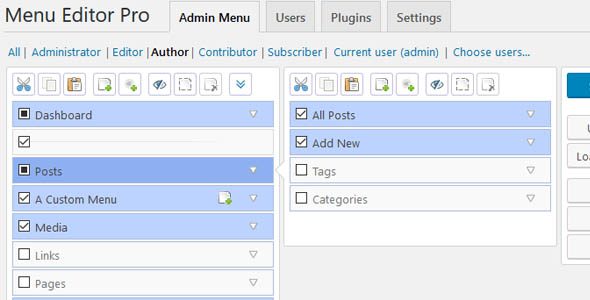
Admin Menu Editor Pro is a WordPress plugin that hands you full control over the admin dashboard menu: reorder items with drag and drop, rename them, hide them per role or per user, recolor the whole menu, and add your own entries. The Pro edition also bundles the WP Toolbar Editor add-on for customizing the admin bar, so a single package covers both navigation surfaces of wp-admin.
What it does
The core editor loads your current menu structure into a two-pane interface. Any item can be moved between the top level and submenus, renamed, pointed at a different URL, given a new icon or CSS classes, or hidden entirely. Pro goes further than the free version by making permissions role-aware: click a role in the sidebar, uncheck the menu items that role should not see, and the change applies only to users carrying that role. You can also grant or revoke access for individual users — hiding every menu from a client except the two pages they actually use, for example.
Presentation controls sit next to permissions. The plugin ships with more than six hundred icons from Dashicons and Font Awesome, accepts your own images through the Media Library, and recent versions let you paste raw SVG markup straight into the icon selector. A color editor manages background, text, icon and highlight colors for the entire menu or for single items, and menu headings support custom styles and margins. New entries can link to any admin or external URL, open in a new tab or a borderless frame, or act as non-clickable section headers that organize long menus.
Beyond the menu
Despite the name, only part of the feature set concerns the sidebar menu. The Roles tab edits role capabilities with a color-coded overview and per-category badges. The Tweaks tab hides dashboard widgets, admin notices, sidebars, Gutenberg panels and user profile fields, applies custom admin CSS, and blocks chosen URLs by role. The Tables tab hides and reorders columns in admin list tables — a narrower take on what Admin Columns Pro covers in far more depth for content listings. Quick Search opens a popup with a double tap of Shift and searches menus, settings screens, posts and users. Content Permissions adds a box to the post editor for role-based access to individual posts and pages, with a custom error message, simulated 404 or redirect for visitors without access. The Redirects tab configures per-role login, logout and registration destinations, and the Plugins tab hides entries on the Plugins page or edits how plugin names and descriptions appear there.
For audit-style tracking of what your restricted users still do inside the dashboard, pair the plugin with WP Activity Log, which records admin-side events instead of controlling access.
Bundled add-ons
This package includes WP Toolbar Editor 1.5.2, the vendor’s add-on for the WordPress toolbar, also known as the admin bar. It hides toolbar items, reorders them with drag and drop, renames labels, adds new links and keeps separate visibility settings for the dashboard and the frontend. Since the toolbar is where users notice clutter first, the add-on rounds out the menu work without another purchase.
Who it suits
Admin Menu Editor Pro fits agencies and freelancers who hand sites over to clients and want a calm, minimal wp-admin: hide everything irrelevant, surface the client’s own content types, add a branded touch. It also suits membership and multi-author sites where roles need sharply different dashboards. If you want a broad utility toolkit instead — login URL changes, backups, code snippets, CAPTCHA — Admin and Site Enhancements Pro covers that wider ground; the two can coexist, but expect overlap in menu-hiding features.
Requirements and release scope
The vendor declares WordPress 5.9 or newer and PHP 7.4 or newer, with version 2.37.1 tested up to WordPress 7.1.2. These are vendor-declared values, not a runtime guarantee for your specific stack. Multisite is supported when the plugin is network-activated or installed in the must-use plugins directory; in that setup only super admins can open the editor, while other users simply see the customized menu.
This package is the 2.37.1 release of the Pro edition with no license key, so vendor support tickets and automatic updates are unavailable. Packages are spot-checked on an isolated test install, and every archive passes ClamAV and heuristic scans before it is published.
What changed in Admin Menu Editor Pro 2.37.1
Released on October 3, 2026, this version adds optional checksum and signature verification for plugin updates. It stays optional by default pending more real-world testing, but you can switch it to required in the Settings tab under Update verification. A new Block URLs section in the Tweaks tab blocks access to chosen admin and frontend URLs by role for logged-in users, and the release is declared tested up to WordPress 7.1.2.
Installation and rollback
Back up the database and files first. On staging, upload the ZIP through Plugins → Add New → Upload Plugin, activate, then open the Menu Editor Pro settings page and rebuild your menu configuration one section at a time, checking wp-admin as each affected role. Be careful with permissions on core menus and with login redirects — misconfiguration can lock non-admin users out of screens they need, so test with accounts for every role, not only the administrator. For rollback, deactivate the plugin and restore the previous package version; the plugin stores its configuration in a single wp_options entry, so a full reset means removing that row per the vendor documentation.
Documentation review on November 15, 2026: official product information was checked; no installation or runtime test was performed.