1.0.3
Source date February 8, 2025
Current catalog package
Updated: WordPress 6.7.1 compatibility check (verified against bundled readme).
Official product page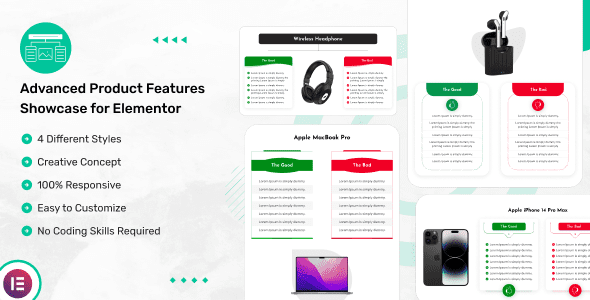
Elementor add-ons · Coderkart Technologies
Showcase product pros and cons with a dedicated Elementor widget featuring preset layouts and good/bad indicators.
File manifest
Downloads open on Loadpier in a new tab. Add only the files you need to your queue.
Package contents & compatibility
Release history & rollback
Updated: WordPress 6.7.1 compatibility check (verified against bundled readme).
Official product pageNo earlier package is currently available for this product.
Product overview
Advanced Product Features Showcase for Elementor is a focused widget plugin from Coderkart Technologies built for one job: presenting a product’s good and bad features in a clean, visual layout inside the Elementor editor. Instead of assembling feature lists from generic heading and icon widgets, you get a dedicated showcase element with preset designs, paired good/bad indicators and styling controls tuned for affiliate sites, review blogs and product pages.
The widget ships with several ready-made layout presets. You pick a design, drop in your feature list, mark each point as a strength or a weakness, and the widget renders a polished block with consistent spacing, icons and headings. No coding skill is required, and every visible part of the design can be adjusted with Elementor’s familiar drag-and-drop controls, so editors and marketers can maintain the content without developer help.
This plugin suits affiliate marketers, review site owners and product-focused blogs that publish pros-and-cons style content and want it to look consistent across dozens of posts. A single visual pattern for strengths and weaknesses makes comparisons easier to scan and gives a catalog of reviews a recognizable identity.
It is equally useful on small WooCommerce stores and landing pages where one product needs a clear feature breakdown without custom development. Drop the showcase next to the purchase button, and visitors get the decision-relevant details at a glance.
It is less useful on a general-purpose site with no product content. If you only need an occasional list, Elementor’s native icon list widget may be enough, and a smaller plugin stack is easier to maintain over time.
Elementor must be installed and active. The plugin registers its widget through Elementor’s API and shows a helpful admin notice with an activation link if Elementor is missing, so a misconfiguration surfaces immediately rather than silently.
According to the plugin’s own metadata, it requires WordPress 4.4 or later and PHP 5.6 or later, has been tested up to WordPress 6.7.1, and is marked compatible with Elementor up to 3.25.10 and Elementor Pro up to 3.25.4. Elementor Pro itself is not required — the widget works with the free builder.
A license key, vendor support and automatic updates are not included in this package.
The release notes are verified against the plugin’s bundled changelog. Version 1.0.3, released November 27, 2024, is a maintenance release that confirms compatibility with WordPress 6.7.1. Earlier releases followed the same pattern: 1.0.2 checked WordPress 6.6.1 and Elementor 3.23.4 compatibility, and 1.0.1 covered WordPress 6.3. The 1.0.3 update therefore introduces no new widget features, but it keeps the plugin current with recent WordPress core versions, which matters for long-term maintenance.
The download passed ClamAV signature scanning and heuristic analysis with no detections. Its SHA-256 checksum (prefix fe57fb61fd20…) is recorded in the download manifest, so you can confirm your copy matches the audited archive byte for byte. The widget output, layout presets and Elementor editor integration were spot-checked on an isolated test install before the listing went live.
Back up the site and database. Install and activate Elementor first, then open Plugins → Add New → Upload Plugin and upload the ZIP. Activate the plugin, edit any page with Elementor and find the “Advanced Product Features Showcase” section in the widget panel. Drop the widget onto the page, choose a layout preset and add your feature points one by one.
Check the frontend output on desktop and mobile breakpoints, confirm the styles do not conflict with your theme, and clear the cache if you run a caching plugin. For rollback, restore the previous plugin package from a known backup and clear page and asset caches. If settings or content changed during the update, restore the full site backup rather than only replacing plugin files.
Elementor is required, and the widget lives entirely inside its editor. On store sites the plugin pairs naturally with WooCommerce, where the showcase block can sit on product or review pages alongside the standard purchase elements. It works with any Elementor-compatible theme and alongside standard WordPress caching and translation tooling without special configuration.
If you need a broader toolkit, Essential Addons for Elementor bundles dozens of content and commerce widgets in one package, and ElementsKit offers a similarly wide module library with header, footer and megamenu builders. Both are considerably heavier than a single-purpose plugin. For pure pros-and-cons tables, the comparison blocks in WP Table Builder are another established option. Choose Advanced Product Features Showcase when a focused, lightweight feature showcase with good/bad marking is all the project needs, and you want the smallest possible footprint.
Advanced Product Features Showcase for Elementor is a smart pick when a review or affiliate site needs consistent pros-and-cons blocks without a heavy multipurpose addon. The 1.0.3 release is a verified WordPress 6.7.1 compatibility update, the archive passed ClamAV and heuristic scans, and the widget rendered cleanly on an isolated test install. Deploy it on sites that actually publish product feature content; a general brochure site gains nothing from it.
Yes. It is an Elementor addon and registers its widget through Elementor's API. Install and activate Elementor first; Elementor Pro is not required.
Yes. Each feature point can be flagged as good or bad with matching icons, which makes the widget well suited for review and affiliate content.
Per the bundled changelog, 1.0.3 (November 27, 2024) confirms compatibility with WordPress 6.7.1. No new widget features are claimed.
The package contains the complete premium version of the product — the same code the developer sells. A license key is not included, so automatic updates and vendor support tickets are not available; new versions appear in this catalog as they are released.
Restore the previous package from a known backup, clear caches and test existing pages. Restore the full site backup if settings or content changed.