3.7.3
Source date November 22, 2026
Current catalog package
StoreBolt instant search integration, demo importer and content improvements, plus slider and PHP notice fixes.
Official product page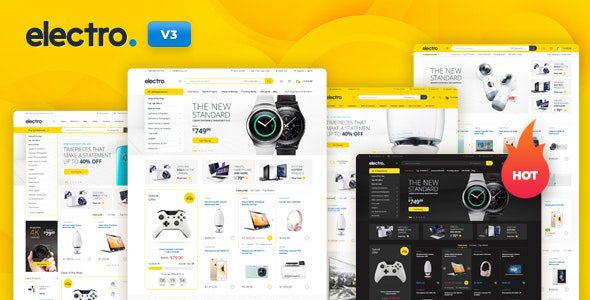
Online store · MadrasThemes
Build a structured electronics storefront with WooCommerce-focused layouts and catalog tools.
File manifest
Downloads open on Loadpier in a new tab. Add only the files you need to your queue.
Package contents & compatibility
Release history & rollback
StoreBolt instant search integration, demo importer and content improvements, plus slider and PHP notice fixes.
Official product pageNo earlier package is currently available for this product.
Product overview
Electro is a WooCommerce theme built for electronics and other specification-heavy catalogs. It gives store owners multiple homepage layouts, product blocks, header options and shop controls, making it possible to organize categories, promotions and featured items without designing every section from scratch.
The theme is a presentation and merchandising layer rather than a complete store by itself. Product data, payments, shipping, taxes and orders remain WooCommerce responsibilities. Plan those operations first, then use Electro to make the catalog easier to browse.
Electro fits electronics retailers, computer and accessory shops, appliance catalogs and multi-brand stores with many categories. It is particularly relevant when visitors need clear department navigation and product-focused landing pages.
A small store with a handful of products may not benefit from its range of layout options. Likewise, a marketplace should confirm that its chosen vendor plugin and workflow match the theme before committing to a design.
The official documentation lists WooCommerce and Electro Extensions among its recommended plugins, alongside optional demo, form, slider and page-builder tools. Recommendations are not a reason to install everything: choose components according to the selected layout and remove unused demo material.
Exact WordPress and PHP compatibility has not been verified for this package. No license key, developer support or automatic updates are included. Keep a separate update plan and test compatibility on staging. Before publication the package goes through malware and heuristic scanning, and its SHA-256 hash is documented in the file manifest for verification.
The official changelog dated October 6, 2026 adds instant search through StoreBolt integration. Demo import now lists only plugins used by the chosen demo and identifies required ones. WPForms Lite is recommended rather than required, while HubSpot was removed from the importer.
Demo content received updated dates, WebP images and WooCommerce store pages, with duplicate pages and dead image URLs addressed. Fixes cover stalled imports, the Home v1 slider with Slider Revolution’s SR7 engine, onboarding interruptions, WP-CLI slider imports and PHP 8.5 deprecation notices. These are release-note claims, not independently reproduced test results.
Back up the site files and database, then work on staging. Install and configure WooCommerce before activating the storefront design. In WordPress, open Appearance → Themes → Add New → Upload Theme, select the main theme ZIP, install it and activate Electro. Add only the companion plugins required by your chosen layout. Import demo content on a disposable staging site where possible, then check menus, product pages, cart, checkout and mobile navigation.
For rollback, switch to a known working theme and restore the pre-installation backup if settings or imported content must also be reversed. Keep the prior theme package and backup until the store has completed a full checkout review.
Electro is most useful when a store needs department-style navigation, dense product catalogs and several ways to merchandise electronics. Its homepage blocks and shop options can reduce custom layout work, but the demo importer and companion plugins add setup choices. Start with one demo, remove unused components and check the catalog, search and checkout on staging before changing a live store.
Electro provides the storefront design and merchandising features. WooCommerce handles products, payments, shipping, taxes and orders, so configure it first.
No. Select only the plugins needed by your chosen layout and features. The 3.7.3 importer identifies plugins used by each demo and marks required ones.
The official release adds StoreBolt instant search integration, refines demo selection and content, and fixes several importer, slider and PHP notice issues.
The package contains the complete premium version of the product — the same code the developer sells. A license key is not included, so automatic updates and vendor support tickets are not available; new versions appear in this catalog as they are released.
Activate a known working theme, then restore your file and database backup if you also need to undo settings or demo content. Practice rollback on staging first.