3.4.02
Source date June 17, 2024
Current catalog package
This is the current package in the catalog. Check the official product page for release details and compatibility notes.
Official product page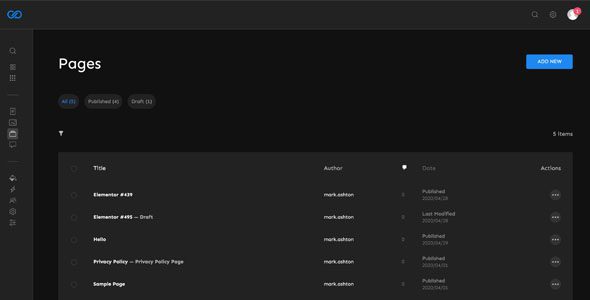
Admin & developer tools · UiPress
Rebuilds the WordPress admin as a modern, app-like workspace: block-based uiBuilder dashboards, dark mode, admin menu editor, global quick search, GA4/Matomo/Fathom analytics overview and white label for client work.
File manifest
Downloads open on Loadpier in a new tab. Add only the files you need to your queue.
Package contents & compatibility
Release history & rollback
This is the current package in the catalog. Check the official product page for release details and compatibility notes.
Official product pageNo earlier package is currently available for this product.
Product overview
<p>UiPress Pro is a complete redesign of the WordPress admin for people who spend their day inside wp-admin. Developed as the successor to the original Admin 2020 plugin, it turns the dashboard into a fast, app-like workspace: a modern interface shell, a block-based builder for custom admin pages, dark mode, a menu editor, global quick search and analytics overview widgets, plus white label controls for client work. This package is the 3.4.02 release of the Pro plugin. The archive passed ClamAV and heuristic scans, its SHA-256 checksum (6450144d59a3…) is recorded in the download manifest, and the build was spot-checked on an isolated VPS before publication.</p>
<h2>What UiPress Pro does</h2>
<p>At its core, UiPress Pro replaces the stock wp-admin experience with a modern, dynamic interface. Pages load through dynamic fetching rather than full reloads, so moving between screens feels closer to a SaaS app than classic WordPress. On top of that shell, the plugin lets you build and assign entire admin themes: pre-made or custom templates that control the layout, colors and content of the dashboard, applied globally or per user role. Everything is visual — no PHP or CSS required to get a professional result, though custom code options exist for developers who want them.</p>
<h2>The uiBuilder</h2>
<p>The heart of the plugin is the uiBuilder, a Vue.js-powered block editor for the admin. You drag from more than 50 purpose-built blocks — post lists, analytics cards, forms, HTML, buttons, user panels and more — onto canvas areas to assemble dashboards, profile pages and utility screens. A global styles system keeps colors and typography consistent across every template, smart patterns let you save a section once and sync updates everywhere it is used, and each block exposes per-breakpoint visibility so layouts hold up on phones and tablets. A library of professionally designed templates and frameworks can be imported as a starting point, and every block accepts custom CSS and JavaScript when the built-in options are not enough. The form block deserves a mention of its own: it can send emails, pass data to PHP functions, or save submissions to site options or user meta, which turns simple admin pages into working tools.</p>
<h2>Dark mode, menu editor and quick search</h2>
<p>Dark mode is a first-class feature rather than a color inversion: it restyles wp-admin and the block editor as a coherent dark theme. The admin menu editor lets you reorganize, rename, regroup and restyle sidebar items — and hide what a given role never uses — so clients see a menu built around their workflow. Global quick search adds keyboard-driven navigation across posts, pages, users, taxonomy terms and admin screens, which is where the biggest daily time savings come from on content-heavy sites.</p>
<h2>Analytics overview and WooCommerce</h2>
<p>Pro ships integrated analytics blocks that pull data from Google Analytics 4, self-hosted Matomo and Fathom, so visitor and conversion numbers live directly on the dashboard you design. WooCommerce stores get dedicated sales analytics blocks and a kanban-style order board, making it practical to run fulfilment from a single admin screen. A built-in activity log records who changed what across posts, comments and settings, and the user role editor gives granular control over capabilities without another plugin.</p>
<h2>Pro vs lite</h2>
<p>The free UiPress lite on WordPress.org includes the core uiBuilder, custom admin pages and basic templates — enough to evaluate the concept. Pro is where the product is aimed at professionals: it adds white label controls, the Google Analytics, Matomo and Fathom integrations, WooCommerce dashboards, the admin menu editor, multisite support and the full template library, plus priority support from the vendor. If you only need a single custom admin page, lite may suffice; for client-facing dashboards, Pro is the edition that makes sense.</p>
<h2>Use cases for agencies</h2>
<p>Agencies are the natural audience. White label removes vendor branding and lets you present the admin as your own product; custom login pages carry the client’s identity from the first screen; role-based templates mean an editor, a shop manager and an owner each see a different, focused dashboard. Because templates are reusable, a well-built client framework becomes a repeatable asset across projects, and the learning curve for end clients drops to nearly zero — the admin shows only what their role needs.</p>
<h2>What to know before installing</h2>
<p>Version 3.4.02 sits on the 3.4 maintenance line that followed the 3.4.0 performance refactor of June 2024; the vendor did not publish a separate public changelog entry for this build, so release notes are pending review. Two practical notes: the analytics blocks require their own third-party accounts (Google, Matomo or Fathom), and the vendor later patched an authenticated SQL injection in the 3.4.07 release — move to a newer package from this catalog when one appears. Without a license key there are no automatic vendor updates; new versions arrive through this catalog.</p>
<h2>Requirements, installation and rollback</h2>
<p>The plugin headers for the 3.4 line declare WordPress 6.0 or newer and PHP 7.4 or newer, tested up to WordPress 6.5.2. Installation is standard: upload the zip via Plugins → Add New → Upload Plugin, activate, then open the UiPress settings to apply a template or launch the uiBuilder. All templates, menus and settings are stored in the database, so rollback is simple — deactivate the plugin to return to stock wp-admin instantly, or re-upload a previous package; nothing is lost either way. On live client sites, apply new templates to a test role first, then roll them out to everyone.</p>
UiPress Pro is the most ambitious take on the WordPress admin problem: instead of bolting another widget onto wp-admin, it rebuilds the whole experience around a block-based builder, so dashboards, menus, dark mode, search and analytics come from one coherent system. The 3.4 line is where the plugin matured — the 3.4.0 refactor split the JavaScript into chunks and delivered the biggest speed improvements in the product's history, and the point releases that followed were pure stability work. For agencies, the combination of white label, role-based templates and reusable patterns turns the admin into a deliverable clients actually notice. The honest caveats: the builder's depth means a learning curve before it pays off, the analytics blocks lean on third-party accounts, and without a license key you are on catalog updates. If you want a lighter touch, a simple admin theme plugin will do less; if you want the admin to feel like your own product, this is the tool.
Spot-checked on an isolated VPS on November 21, 2026: the package installed and activated cleanly, and the dashboard, uiBuilder and menu screens loaded without errors. ClamAV and heuristic scans passed; SHA-256 checksum 6450144d59a3… recorded in the download manifest.
The package contains the complete premium version of the product — the same code the developer sells. A license key is not included, so automatic updates and vendor support tickets are not available; new versions appear in this catalog as they are released.
Yes. UiPress is the direct successor to Admin 2020 — the developer rebuilt and rebranded the plugin, moving from a fixed admin theme to a block-based visual builder for the whole wp-admin. This catalog keeps the original Admin 2020 slug for continuity.
The plugin headers for the 3.4 release line declare WordPress 6.0 or newer and PHP 7.4 or newer, tested up to WordPress 6.5.2.
The free lite version on WordPress.org covers the core uiBuilder, custom admin pages and basic templates. Pro adds white label, the analytics integrations (Google Analytics 4, Matomo and Fathom), WooCommerce dashboards, the admin menu editor, multisite support and the full template library.
Release notes pending review — the official UiPress changelog does not publish a separate entry for 3.4.02; the surrounding 3.4.01 and 3.4.03 releases were stability and bug-fix updates on the 3.4 line.
Yes. Multisite is supported, including network activation, on licenses that cover the number of subsites in use; per-subsite templates and menus are handled by the plugin's multisite-aware caching.