Codenulled
Divi logo

Builder-friendly themes · Elegant Themes

Divi

Explore Divi’s visual builder and Theme Builder. Compare Divi 5 with the separate Divi 4 rollback package and installation requirements.

Catalog package5.19.0Source date November 19, 2026Download 5.19.0
Release history & rollback5.18.2

File manifest

Choose packages

1 available
PackageVersionFileAction
Divi WP ThemeMain package
5.19.0
36.5 MB60797a256756…
Download

Downloads open on Loadpier in a new tab. Add only the files you need to your queue.

Package contents & compatibility

What to install and what depends on it

PackageInstall orderDependencyScan
Divi WP Theme1 · install firstCheck product requirementsPassed
File checksClamAV + heuristic
WordPress / PHP compatibilityUnknown — not verified
SHA-256Checks download integrity, not security

Release history & rollback

Current by default, previous when needed

5.19.0 Source date November 19, 2026

Current catalog package

Divi 5.19.0 fixes stale component instances after deletion, inherited Timeline layout gaps, a Builder crash with the 360° Product Rotation plugin, apostrophes being stored as HTML entities in custom attributes, and password-protected post content leaking through loop and dynamic excerpts.

Official product page
4.27.6Previous package

For compatibility or rollback

Download this earlier package only when you need to reproduce an issue or verify an older workflow.

Download 4.27.6 for rollback

Product overview

What Divi does

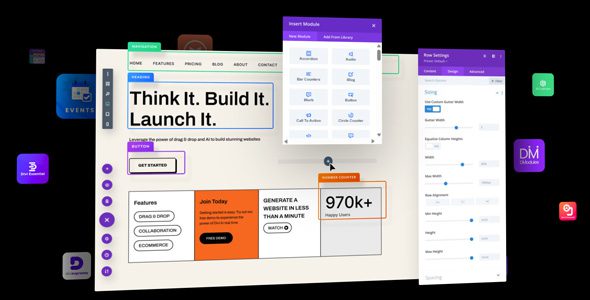
Divi is a WordPress theme with an integrated visual builder for pages and site-wide templates. You edit layouts on the canvas, adjust styles for different screen sizes, and reuse presets or saved elements across a site. The Theme Builder manages shared headers, footers and templates without a separate builder plugin.

Other builder-friendly themes include Blocksy, Neve and JupiterX.

Version 5.19.0 is the current package in this listing. The separate Divi 4.27.6 archive is an older major-version package for a specific rollback or migration test. It is not an addon and is not required alongside Divi 5.

Key features

  • Visual editing: place modules, edit text directly and arrange layouts while viewing the page.
  • Responsive controls: adjust design settings across customizable breakpoints and check each layout at different widths.
  • Theme Builder templates: assign shared headers, footers and content templates instead of rebuilding them for individual pages.
  • Reusable design controls: use global variables, presets and saved elements to keep repeated styling consistent.
  • Layout portability: save layouts in the Divi Library and import or export them when moving work between sites.

Who it is for

Divi suits site owners and designers who want to control page layouts and shared templates through a visual interface. It is useful when several pages need the same design system, since preset and global-element changes can be managed centrally.

A site already built around the WordPress block editor needs a careful migration review. Check existing Divi 4 layouts, child-theme customizations and third-party Divi extensions before moving a production site to Divi 5. For a small site with fixed templates, the additional builder interface may be unnecessary.

Things to know

Exact WordPress and PHP compatibility has not been verified for this package. No license key, developer support or automatic updates are included. Account-based services such as Divi AI and Divi Cloud are separate developer offerings and are not activated by the theme archive.

The catalog archives are scanned and checksum-verified, and the file manifest publishes the hash so you can confirm the download yourself.

What changed in Divi 5.19.0

Divi 5.19.0, released November 6, 2026, fixes stale component instances after deletion, inherited Timeline layout gaps, a Builder crash with the 360° Product Rotation plugin, apostrophes being stored as HTML entities in custom attributes, and password-protected post content leaking through loop and dynamic excerpts.

Installation and rollback

Back up the site files and database first. In WordPress, open Appearance → Themes → Add New → Upload Theme, select the Divi 5.19.0 ZIP, install it and activate the theme. Do not install the Divi 4.27.6 archive as an additional component. After activation, review Theme Builder assignments, menus, forms and responsive layouts. If the site uses WooCommerce, check the shop page and product templates as well.

For rollback, test the older package on staging before touching production. Divi 5 content may not translate cleanly back to Divi 4. Restore a known backup where possible, then check pages, global templates and custom code. Keep the current package and backup available until the earlier version has passed those checks.
Our take

Divi fits WordPress sites that need visual editing and shared templates rather than a collection of one-off page designs. Version 5.19.0 fixes builder, layout, custom-attribute and protected-content issues in the official notes. Treat the Divi 4 archive as a separate rollback option, and test any major-version move on staging.

Good

  • Visual editing for pages and site-wide Theme Builder templates
  • Responsive controls, presets and reusable design variables
  • Official 5.19.0 notes document builder, layout and protected-content fixes
  • Divi 4.27.6 is supplied separately for rollback testing

Watch out

  • Major-version migration requires layout and integration testing
  • Exact WordPress and PHP compatibility has not been verified
  • No license key, developer support or automatic updates included
  • Account-based AI and Cloud services are not included

Requirements and compatibility

  • Exact WordPress and PHP requirements have not been verified for this package.
  • Test the main package and each addon on a staging site before updating production.
  • A license key is not included. Developer support, automatic updates and cloud services are separate offerings from the original developer.

How to install Divi

  1. Download the main package on this page. Keep addons for later unless you need their features.
  2. In WordPress, open Appearance → Themes → Add New → Upload Theme, upload the ZIP and activate it after installation.
  3. Install additional packages only after checking that the main product works with your site.
  4. Test your critical workflow on a staging site before updating production.

Compare with

Divi FAQ

Is Divi 4.27.6 required with Divi 5.19.0?

No. It is a separate older theme archive for a specific compatibility or rollback test, not an addon for Divi 5.

Does the archive include Divi AI or Divi Cloud?

No. These account-based services are separate developer offerings and are not activated by installing the theme.

What changed in Divi 5.19.0?

The official changelog lists fixes for stale components, Timeline layouts, a Builder crash, custom-attribute apostrophes and protected content in loop and dynamic excerpts.

Is this the full Pro version of the product, and is a license key included?

The package contains the complete premium version of the product — the same code the developer sells. A license key is not included, so automatic updates and vendor support tickets are not available; new versions appear in this catalog as they are released.

How is this package checked before publication?

Every archive passes ClamAV and heuristic scans before it appears in the catalog, and the file manifest publishes the SHA-256 hash so you can verify the download byte for byte.

Which builder-friendly themes can I compare with Divi?

Blocksy, Neve and JupiterX offer alternative workflows for page building and shared design controls. Test your actual content before choosing a system.

Can Divi 4.27.6 be installed as an addon for Divi 5?

No. It is a separate older theme package for rollback or migration testing, not a component to install alongside Divi 5.