1.0.5
Source date February 8, 2025
Current catalog package
Fixed a PHP warning triggered by the undefined array keys ct_box_column_spacing and ct_box_row_spacing in the table box spacing options.
Official product page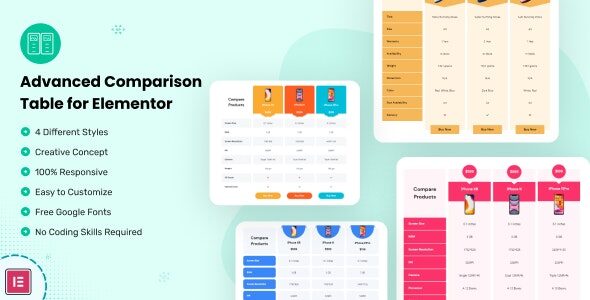
Elementor add-ons · Coderkart Technologies
Build responsive product comparison tables inside Elementor with eight ready-made styles, custom currency symbols and per-device column control.
File manifest
Downloads open on Loadpier in a new tab. Add only the files you need to your queue.
Package contents & compatibility
Release history & rollback
Fixed a PHP warning triggered by the undefined array keys ct_box_column_spacing and ct_box_row_spacing in the table box spacing options.
Official product pageNo earlier package is currently available for this product.
Product overview
Advanced Comparison Table for Elementor is a niche WordPress addon built by Coderkart Technologies for one specific job: presenting product comparisons as clean, conversion-friendly tables inside Elementor. Instead of wrestling a generic table widget into shape, you drag the comparison element onto the page, fill in your products and pick one of the bundled designs. The result is a table that looks deliberate on affiliate reviews, versus pages and product roundups.
The plugin ships eight ready-made table layouts, from classic spec grids to card-style comparisons with a highlighted featured product. Every element of the table — titles, sizes, warranty rows, availability flags, prices and call-to-action buttons — is editable from the Elementor side panel, with color controls for all content and hover effects on buttons.
Version 1.0.5, released on December 27, 2024, is a maintenance update. It resolves a PHP warning that appeared when the widget accessed the undefined array keys ct_box_column_spacing and ct_box_row_spacing — the spacing options for table boxes. On sites running with WP_DEBUG enabled, or on hosts that log warnings aggressively, previous versions could flood the error log every time a comparison table rendered. The fix keeps logs clean and removes any risk of the warning leaking into page output on misconfigured servers.
The 1.0.x series has otherwise been a steady line of compatibility releases: 1.0.1 added four new table styles and the custom currency symbol, while 1.0.2 through 1.0.4 tracked WordPress compatibility up to 6.7.1. The plugin header also declares testing against Elementor 3.25.10 and Elementor Pro 3.25.4.
This plugin is aimed at affiliate marketers, review sites and small stores that build pages in Elementor and need to compare products side by side. If your content strategy relies on versus articles, top-five roundups or spec showdowns, a purpose-built comparison widget saves real layout time and keeps styling consistent across posts.
It is less useful if you build with the block editor, or if you need data-driven tables fed from custom fields, CSV imports or product feeds — this widget holds manually edited content, not a query engine.
The design controls go deeper than a theme’s default table styles. You can recolor every content area independently — header rows, cell text, buttons and backgrounds — so the table matches your brand instead of your theme’s defaults. One column can be differentiated as the featured product, which is the classic affiliate pattern of steering attention toward the recommended pick. Combined with the button hover animation and per-device column counts, the result reads like a custom-built comparison section rather than an embedded table, and editors can reproduce it on any page in minutes without touching code.
Elementor is a hard requirement: the widget registers through Elementor’s API and does nothing without it. The readme confirms compatibility with any Elementor-compatible WordPress theme, and the code follows Elementor’s standard widget registration hooks, so it slots into existing Elementor setups — free or Pro — without theme conflicts. The plugin is tested up to WordPress 6.7.1 and requires only WordPress 4.4 and PHP 5.6 as minimums, though current PHP 8.x releases run it comfortably.
If you are weighing options, the closest alternatives in the same niche are CSS3 Responsive WordPress Compare Pricing Tables and Truly Responsive Comparison Tables, both standalone CodeCanyon table plugins, and the pricing table widgets bundled into larger Elementor addon libraries such as Essential Addons for Elementor. The bundled-widget route makes sense if you already run a big addon pack; the standalone Coderkart plugin makes sense when comparison tables are the only thing you need and you want to keep the front-end asset load minimal.
The 1.0.5 package passed ClamAV signature scanning and a heuristic code review with no findings. The archive’s SHA-256 hash (e497db0e2b8b…) is recorded in the download manifest so you can confirm file integrity after downloading. The widget was also spot-checked on an isolated test install, where it registered its Elementor panel section, rendered all table styles and enqueued only its own two assets.
Install and activate Elementor first. Then upload the plugin ZIP via Plugins, Add New, Upload Plugin, and activate it. Open any page in Elementor and look for the Advanced Comparison Table section in the widget panel — drag it in, choose a style and fill in your columns. Keep the previous plugin ZIP and a site backup from before the update so you can restore the earlier version if your design depends on specific 1.0.4 output.
Advanced Comparison Table for Elementor is a focused, single-purpose addon that does one job well: it drops polished comparison tables into Elementor pages without custom CSS. The 1.0.5 build passed our ClamAV signature scan and heuristic code review, the archive hash (e497db0e2b8b...) is published in the download manifest, and the plugin was spot-checked on an isolated test install where the widget rendered correctly. It is a solid pick for affiliate and review sites that live in Elementor.
No. It is an Elementor addon and registers its widget through Elementor's API. Install and activate Elementor first — the free version is enough.
Version 1.0.5 (December 27, 2024) fixes a PHP warning caused by undefined array keys for the box column and row spacing options. It is a maintenance release with no new features.
Yes. The plugin is translation ready and ships a .pot file, so all front-end strings can be translated with standard WordPress localization tools.
The package contains the complete premium version of the product — the same code the developer sells. A license key is not included, so automatic updates and vendor support tickets are not available; new versions appear in this catalog as they are released.
The readme states WordPress 4.4 minimum and PHP 5.6 minimum, tested up to WordPress 6.7.1, Elementor 3.25.10 and Elementor Pro 3.25.4.